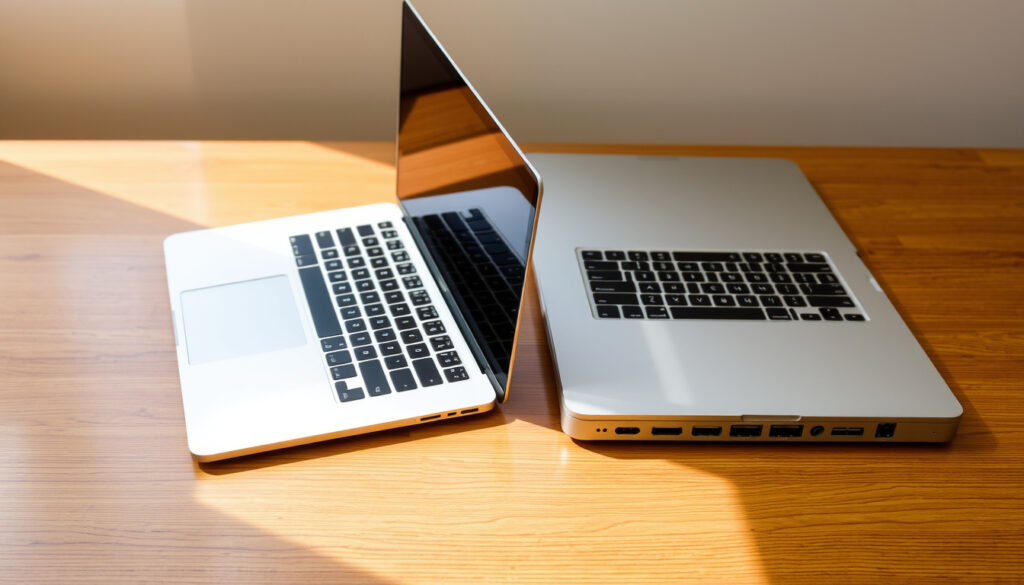
MacBook Air vs MacBook Pro: Which Should You Buy
You’ve spent an evening reading specs, only to walk away more confused about which MacBook to buy. The MacBook Air and MacBook Pro are both excellent machines, but they’re built for fundamentally different kinds of work.
MacBook Air weight: 2.7 lbs (13.6-inch) ·
MacBook Pro weight: 3.4 lbs (14-inch) ·
MacBook Air battery life: Up to 18 hours ·
MacBook Pro battery life: Up to 22 hours ·
MacBook Air starting price: $1,099 ·
MacBook Pro starting price: $1,699
Quick snapshot
- MacBook Air: M4 chip only, fanless, 2.7–3.3 lbs (Apple MacBook Air official specs page)
- MacBook Pro: M4, M4 Pro, M4 Max chips, active cooling, 3.4–4.7 lbs (Apple MacBook Pro official specs page)
- Exact release date of a possible MacBook Neo (unconfirmed product) (PCMag tech review site)
- Real-world battery life varies; PCMag tested 15-inch Air at 18h52m (PCMag tech review site)
- M4-series MacBook Air released early 2025 (Apple announcement)
- M4 Pro/Max MacBook Pro released late 2024 (Apple MacBook Pro)
- Rumours of M5 chips in 2026; no official confirmation (9to5Mac Apple-focused news outlet)
- Apple’s Mac lineup may expand with a new model (9to5Mac Apple-focused news outlet)
The pattern is clear: the Air trades maximum power for lighter weight, while the Pro trades portability for workstation-class capability.
| Spec | MacBook Air (13-inch) | MacBook Pro (14-inch) |
|---|---|---|
| Weight | 2.7 lbs | 3.4 lbs |
| Battery life | Up to 18 hrs | Up to 22 hrs |
| Starting price | $1,099 | $1,699 |
| Maximum RAM | 24 GB | 128 GB |
| External displays | 1 | Up to 3 |
| Fan noise | None (fanless) | Active fans under load |
Which is better between a MacBook Pro and a MacBook Air?
The bottom line: The Air suits students, travelers, and office workers. The Pro is for video editors, developers, and anyone needing sustained performance across multiple displays.
Key differences at a glance
The MacBook Air is thinner, lighter, and fanless, making it ideal for quiet, portable use. The MacBook Pro packs active cooling, higher-end chips, and longer battery life — but at the cost of extra weight and a higher price tag. Apple’s own Mac compare page official comparison tool positions the Air as the everyday laptop and the Pro as the performance powerhouse.
Who should choose the MacBook Air?
- Students, travelers, and anyone who prioritises portability: the 13-inch Air weighs 2.7 lbs (Apple MacBook Air Tech Specs).
- Users whose workload stays within web browsing, email, office apps, and streaming — the fanless M4 chip handles these without breaking a sweat.
- Budget-conscious buyers: the Air starts at $1,099, which is $600 less than the base Pro (9to5Mac Apple buyer’s guide).
Who should choose the MacBook Pro?
- Video editors, developers, 3D artists, and anyone who needs sustained performance — the Pro’s active cooling prevents thermal throttling (Apple MacBook Pro performance claims).
- Users who need multiple external monitors: the Pro supports up to three displays, the Air only one.
- Professionals who want the highest possible RAM (up to 128 GB) and storage (up to 8 TB), options the Air cannot match (Apple MacBook Pro Tech Specs).
Most buyers overestimate their need for power. If your daily driver is a browser and a word processor, the Air saves you $600 and a pound of backpack weight. Only if you compile, render, or run simulations regularly does the Pro’s premium start to pay off.
The implication: “Better” depends entirely on what you do. For the vast majority of users, the Air is more than enough. The Pro is a specialised tool for a specific, demanding audience.
What can a MacBook Pro do that a MacBook Air cannot?
The gap: The Pro handles 8K video editing, 3D rendering, large-scale compilation, and multi-monitor setups. The Air hits a ceiling at 24 GB RAM and one external display.
Performance-intensive tasks
The MacBook Pro can be configured with M4 Pro and M4 Max chips, offering up to a 16-core CPU and 40-core GPU. That’s enough to handle 8K video editing, 3D rendering, and large-scale software compilation without stuttering. The Air is limited to the base M4 chip, which, while capable, will throttle under sustained heavy load because it lacks a fan (Apple MacBook Pro chip options).
Support for multiple external displays
The Air supports only one external display (up to 6K). The Pro, with its M4 Pro or M4 Max chip, can drive up to three external displays at once — a critical feature for traders, developers, and video editors who need multiple screens (Apple MacBook Pro Tech Specs).
Higher RAM and storage configurations
The Air maxes out at 24 GB of unified memory and 2 TB of storage. The Pro can be configured with up to 128 GB of RAM (with M4 Max) and up to 8 TB of SSD storage (Apple MacBook Pro Tech Specs). That difference is non-negotiable for professionals working with large datasets, virtual machines, or high-resolution media.
If you’ve ever hit a wall because your laptop couldn’t handle a task, the Pro is the door that opens. The Air is a breeze for everyday work, but it has a glass ceiling — and that ceiling is set at 24 GB RAM and one external display.
What this means: The gap between the Air and Pro is not a small step — it’s a chasm in raw capability. The Pro exists for users who have already outgrown what the Air can offer.
What is the disadvantage of a MacBook Air?
The catch: The Air’s fanless design causes thermal throttling under heavy loads. It also limits you to one external display, 24 GB RAM, and 2 TB storage — ceilings that power users will hit fast.
Thermal throttling under heavy load
Because the Air has no fan, prolonged heavy tasks — like exporting a 10-minute 4K video or compiling a large codebase — will cause the chip to throttle down to keep temperatures safe. The Pro, with its active cooling, sustains peak performance indefinitely (Apple MacBook Air Tech Specs).
Limited to one external display
Even the latest M4 MacBook Air can drive only one external monitor. That’s a dealbreaker for power users who rely on multi-monitor setups. The Pro supports up to three (Apple MacBook Pro Tech Specs).
Lower maximum RAM and storage
As noted, the Air caps at 24 GB RAM and 2 TB storage. The Pro goes up to 128 GB RAM and 8 TB. For data scientists, video editors, and developers running multiple VMs, that limit is a hard stop.
Smaller battery compared to Pro
Apple rates the Air at up to 18 hours of video playback, while the 14-inch Pro is rated at up to 22 hours (Apple MacBook Pro battery claim). Real-world tests by PCMag measured the 15-inch Air at 18 hours 52 minutes — still impressive, but the Pro lasts longer (PCMag tech review site).
The Air’s fanless design is a blessing for silence and reliability, but it is also its Achilles’ heel. Anyone who demands sustained performance will find the Air’s thermal ceiling frustrating. The Pro’s fans are not a flaw — they are a feature for those who need to push hard for hours.
The pattern: The Air’s disadvantages are all about ceilings — thermal, display, memory, and battery. For lightweight users, those ceilings are irrelevant. For power users, they are dealbreakers.
Is the MacBook Pro worth it over the Air?
The verdict: For 95% of users, the Air is sufficient. The Pro justifies its $600+ premium only for those who compile, render, or run simulations regularly.
Cost-benefit analysis for different user profiles
For a student who writes papers, checks email, and streams Netflix, the $600+ premium for the Pro is wasted. The Air at $1,099 is lighter, cheaper, and for those tasks, identically fast (Apple MacBook Air pricing).
When the Pro premium is justified
If you edit video, work in 3D, run simulations, or need multiple monitors, the Pro’s extra cost is a business expense, not a luxury. The Pro’s M4 Pro chip, active cooling, and higher RAM ceiling directly translate to time saved and projects completed (Apple MacBook Pro performance).
When the Air is sufficient
Reddit consensus in r/macbookair and r/macbookpro is blunt: “The Air is more than enough for 95% of users,” one frequent commenter notes. The Verge’s comparison also highlights that the Air handles everyday tasks effortlessly (The Verge tech news site).
The $600 gap between Air and Pro is not a trade-off — it’s a fork in the road. One path saves you money and weight; the other gives you workstation-class power. The wrong choice costs you either performance or money you didn’t need to spend.
The trade-off: For the vast majority, the Pro is overkill. For the minority who need it, the Air is unusable. Knowing which group you belong to is the entire decision.
Which MacBook should I buy for work or university?
Recommendation: Students should buy the Air for its weight and price. Professionals doing heavy computation need the Pro for its sustained performance and multi-monitor support.
Best MacBook for students
The Air is the clear winner for students: it’s lighter (2.7 lbs), cheaper ($1,099), and has enough battery for a full day of classes (Apple MacBook Air battery claim). Reddit threads in r/macbookair overwhelmingly recommend the Air for coursework, with one user saying “I’ve never felt limited by my Air for anything a professor threw at me.”
Best MacBook for professionals
For engineers, data scientists, and creative professionals, the Pro’s extra power is a productivity multiplier. The ability to drive multiple external monitors, handle large compilations, and render video is often a job requirement (9to5Mac Apple buyer’s guide).
MacBook Air vs MacBook Pro for coding and creative work
For coding, the Air is fine for web development, scripting, and light compilation. For heavy iOS app builds, machine learning, or running Docker containers, the Pro’s extra RAM and active cooling make a noticeable difference. Tom’s Hardware tested the Air M5 and found it capable for most development tasks, but noted that sustained loads push it to the limit (Tom’s Hardware tech reviews).
What this means: For university, buy the Air unless you’re in a program that specifically requires heavy computation (engineering, data science, 3D design). For work, buy the Pro if your job involves constant heavy lifting; otherwise, the Air is the smarter buy.
What are the MacBook Air and MacBook Pro specs?
Three chip families, four screen sizes, and a massive RAM gap separate these two lineups. Here’s the full breakdown.
| Spec | MacBook Air 13-inch | MacBook Air 15-inch | MacBook Pro 14-inch | MacBook Pro 16-inch |
|---|---|---|---|---|
| Chip options | M4 | M4 | M4 / M4 Pro / M4 Max | M4 Pro / M4 Max |
| Weight | 2.7 lbs | 3.3 lbs | 3.4 lbs | 4.7 lbs |
| Battery life (video) | Up to 18 hrs | Up to 18 hrs | Up to 22 hrs | Up to 22 hrs |
| Starting price | $1,099 | $1,299 | $1,699 | $2,499 |
| Max RAM | 24 GB | 24 GB | 128 GB | 128 GB |
| Max storage | 2 TB | 2 TB | 8 TB | 8 TB |
| External displays | 1 | 1 | Up to 3 | Up to 3 |
| Ports | 2 Thunderbolt | 2 Thunderbolt | 3 Thunderbolt, HDMI, SDXC | 3 Thunderbolt, HDMI, SDXC |
| Display brightness (SDR) | 500 nits | 500 nits | 1000 nits | 1000 nits |
| ProMotion 120Hz | No | No | Yes | Yes |
The pattern: The Air is a single-spec, lightweight, affordable machine. The Pro is a platform that scales from competent to monstrous, depending on how much you spend. The Air is a choice; the Pro is a commitment.
Why are MacBook Air not allowed in flights?
The myth: It was never the MacBook Air that was banned — it was certain 2015–2019 15-inch MacBook Pro models with battery fire risk. All current M-series MacBooks are safe and allowed.
This is a common misconception. It was never the MacBook Air that was banned from flights — it was certain 2015–2019 15-inch MacBook Pro models, due to a battery fire risk. The Directorate General of Civil Aviation (DGCA) in India explicitly banned those models from flights (DGCA Indian aviation regulator). All current M-series MacBook Air and MacBook Pro models are safe and fully permitted. Always check airline regulations for lithium battery devices, but the Air has never been the issue.
The MacBook Pro’s active cooling and larger battery once made it a fire risk in older models. Today, the Pro is safer than ever, while the Air’s fanless design remains the quietest option in the lineup. The flight ban confusion is a perfect example of how a single incident can create a myth that persists for years.
What to watch: If you see a headline about “MacBook banned from flights,” check the model year. If it’s a 2015–2019 15-inch Pro, the ban was real. Every other MacBook is fine.
Clarity: what’s confirmed and what’s still open
Confirmed facts
- MacBook Air uses M4 chip only; Pro offers M4, M4 Pro, M4 Max.
- MacBook Air is fanless; MacBook Pro has active cooling.
- MacBook Air weight: 2.7 lbs (13.6-inch), 3.3 lbs (15.3-inch).
- MacBook Pro weight: 3.4 lbs (14-inch), 4.7 lbs (16-inch).
- MacBook Air battery up to 18 hrs; Pro up to 22 hrs.
- MacBook Air starts at $1,099; Pro at $1,699 (as of March 2025).
- MacBook Air supports 1 external display; Pro supports up to 3.
- DGCA banned 2015-2019 15-inch MacBook Pro models from flights; current M-series are safe.
What’s unclear
- Exact release date of MacBook Neo (unconfirmed product).
- Whether Apple will release M5 Air or Pro in 2025 (rumored).
- Reddit user opinions vary widely; no single consensus on ‘best’ model for every scenario.
- Battery life real-world results may differ from Apple’s estimates.
Quotes from the community and experts
“The Air is more than enough for 95% of users.”
— Reddit user in r/macbookair
“The Air wins on weight, but the Pro takes the crown for battery life.”
— CNET reviewer
“Only the Pro models offer the M4 Pro and M4 Max chips.”
— LaptopMag analysis
“In view of the potential fire risk, the DGCA has banned the carriage of certain MacBook Pro models on flights.”
— DGCA official statement
Summary
The MacBook Air and MacBook Pro are not competing products — they serve different audiences. The Air is the smart, light, affordable choice for the vast majority of students, office workers, and casual users. The Pro is the expensive, heavy, powerful tool for professionals who need workstation-level performance. For the typical buyer in Singapore, the Air is the clear winner: it saves you S$400–600, weighs a kilogram less, and still handles everything a university student or office worker throws at it. For the video editor or developer, the Pro is the only option that won’t hold you back. The choice is simple once you know what you actually do.
Related reading: How to Add Printer to Mac · Transfer iPhone to iPhone Methods
apple.com, apple.com, macrumors.com, wired.com, 9to5mac.com, amazon.in
For a detailed comparison of the two models, the MacBook Air vs Pro comparison provides an in-depth look at performance and pricing.
Frequently asked questions
What is the MacBook Air vs MacBook Pro price difference in 2025?
The MacBook Air starts at $1,099, while the MacBook Pro starts at $1,699 — a $600 difference. At the high end, the 16-inch Pro can exceed $6,000 when fully configured.
Is the MacBook Air good for video editing?
For light 1080p editing, the Air is fine. For 4K or 8K projects with effects, the Pro’s active cooling and higher RAM options make it a much better choice. The Air will throttle under sustained load.
Can a MacBook Air handle programming?
Yes, for most programming tasks — web development, scripting, lightweight compilation. For heavy builds, Docker, or machine learning, the Pro’s extra RAM and cooling help significantly.
Which MacBook has better battery life, Air or Pro?
The MacBook Pro gets up to 22 hours of video playback, versus the Air’s 18 hours. Both are excellent, but the Pro lasts longer.
Does the MacBook Pro have a fan?
Yes, the MacBook Pro has active cooling with fans. The MacBook Air is fanless.
Is the MacBook Air allowed on airplanes?
Yes, all current M-series MacBook Air models are allowed. The ban applied only to 2015–2019 15-inch MacBook Pro models with a battery defect.
What is the MacBook Neo? Is it a real product?
The MacBook Neo is not a real product. It’s a rumour or misnomer — no official announcement from Apple exists. Ignore speculation.
Should I buy a MacBook Air M4 or wait for M5?
If you need a laptop now, buy the M4 Air — it’s excellent. The M5 is rumoured for 2026 at the earliest, and waiting rarely pays off unless you have a specific deadline.
More related posts
 Sembawang Hot Spring Park Photos: A Complete Guide to Visiting
 FairPrice Extended Hours Chinese New Year 2026: Price Freeze
 Nature Landscapes Pte Ltd: Services, Contact & Reviews
 ETS JB to KL: Fares, Schedules & 2026 Guide
 Why Does My Stomach Hurt – Causes, Triggers and When to Worry
 Wolverhampton Wanderers F.C. Standings: 16th Place in 2025
 Best Small Camper Vans: Ireland’s 2026 Buyer’s Guide
 Sabrina Carpenter New Album Cover – Short n’ Sweet Reveal and Analysis
